
How to Compare Two JSON Files and See Only the Real Changes
Comparing JSON as plain text buries the change you care about under formatting and key-order noise. Here are terminal, editor, code, and browser approaches that make the actual difference easier to review.
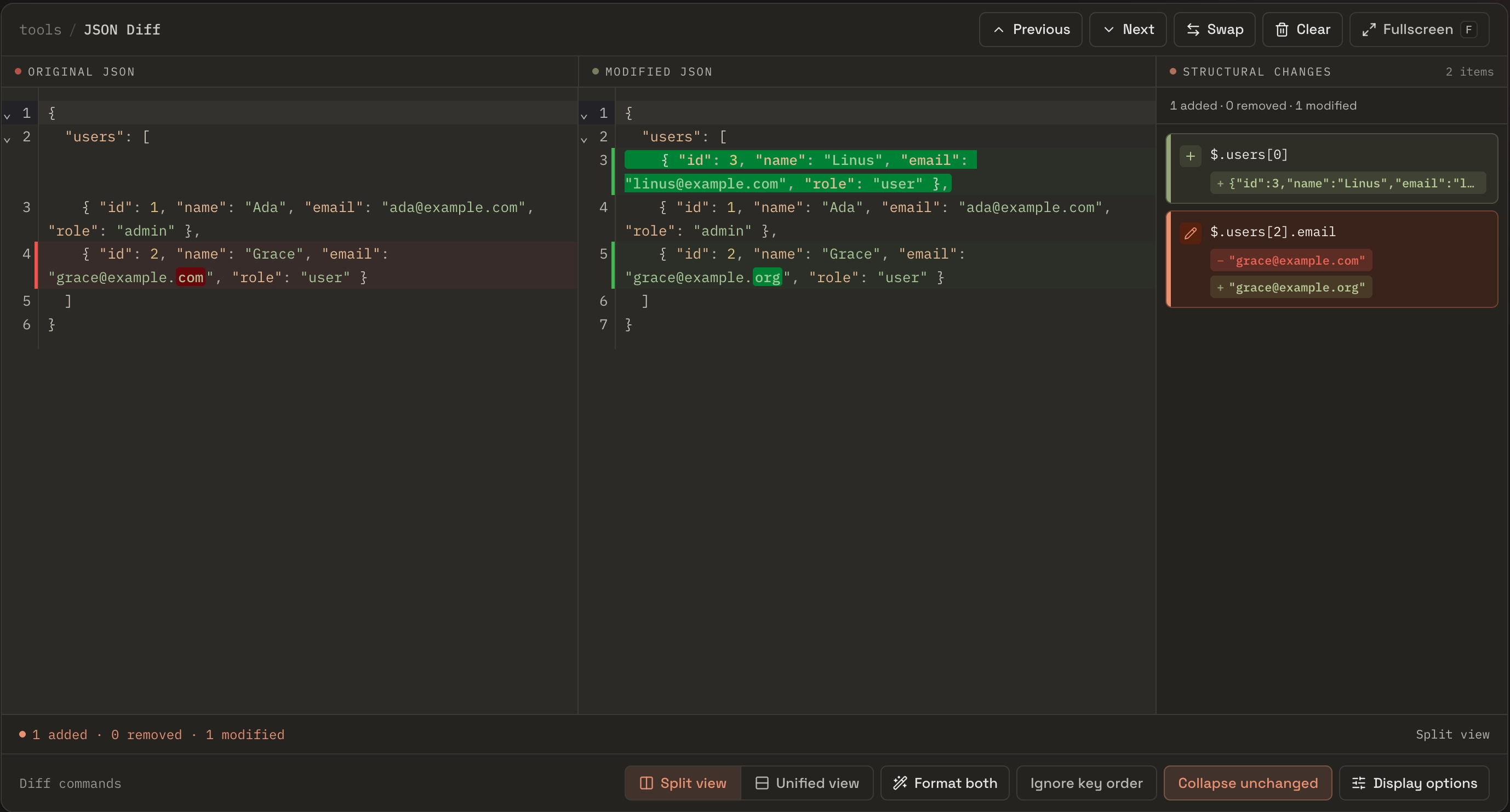
You changed one endpoint and you want to prove it did only what you intended: a field added here, a value flipped there, and nothing else. So you grab the old response and the new one, drop them into a diff, and the whole thing lights up — dozens of red-and-green lines for a change that touched two values.
Often, nothing is wrong with your code. The diff is answering the wrong question. Most diff tools compare text, and JSON that means the same thing can be written many ways: keys in a different order, two-space versus four-space indentation, one payload minified and the other pretty-printed. What you wanted was a comparison of the data. This post walks through ways to get that in the terminal, in your editor, in code, and in the browser — and where each approach helps.
The example we’ll use
Two versions of a /users response. The new version adds one user at the front of the array and fixes a typo in another user’s email domain. That’s the entire change.
// before.json
{
  "users": [
    { "id": 1, "name": "Ada", "email": "ada@example.com", "role": "admin" },
    { "id": 2, "name": "Grace", "email": "grace@example.com", "role": "user" }
  ]
}
// after.json — added user 3, fixed Grace's email domain
{
"users": [
{ "id": 3, "name": "Linus", "email": "linus@example.com", "role": "user" },
{ "id": 1, "name": "Ada", "email": "ada@example.com", "role": "admin" },
{ "id": 2, "name": "Grace", "email": "grace@example.org", "role": "user" }
]
}First, a myth to retire
It’s tempting to say “a text diff can’t handle JSON.” That’s not quite true, and it’s worth being precise. Modern line-diff algorithms are good. Run our two files through git diff and it handles the insertion cleanly:
@@ -1,6 +1,7 @@
 {
   "users": [
+    { "id": 3, "name": "Linus", "email": "linus@example.com", "role": "user" },
     { "id": 1, "name": "Ada", "email": "ada@example.com", "role": "admin" },
-    { "id": 2, "name": "Grace", "email": "grace@example.com", "role": "user" }
+    { "id": 2, "name": "Grace", "email": "grace@example.org", "role": "user" }
   ]
 }
One line added, one line changed. A clean insertion, correctly detected. So the problem isn’t insertion — it’s what happens when the text differs while the data doesn’t.
Where a text diff actually lies
Three things happen constantly with real JSON, and each one makes a text diff light up even though the data barely moved — or didn’t move at all.
Formatting. One side is minified, the other pretty-printed. Identical data, total churn:
@@ -1 +1,6 @@
-{"users":[{"id":1,"name":"Ada"},{"id":2,"name":"Grace"}]}
+{
+  "users": [
+    { "id": 1, "name": "Ada" },
+    { "id": 2, "name": "Grace" }
+  ]
+}
Key order. JSON objects are unordered, but a text diff doesn’t know that. The same record serialized by two different services — or two languages’ JSON libraries — flags as changed purely because the keys came out in a different order:
@@ -1,5 +1,5 @@
 {
+  "email": "ada@example.com",
   "name": "Ada",
-  "role": "admin",
-  "email": "ada@example.com"
+  "role": "admin"
 }
Nothing about Ada changed. Array order does the same thing: reorder the same set of items and a line diff reports the tail as removed-and-re-added. These aren’t edge cases — a formatter running on save, a serializer that sorts keys, or two environments that emit fields in a different order will all trigger them, and they bury the one change you were actually looking for.
Fixing it in the terminal
The cheapest fix is to normalize both sides before diffing. jq -S parses the JSON and re-emits it with keys sorted and formatting made uniform, so key-order and whitespace differences simply vanish:
diff <(jq -S . before.json) <(jq -S . after.json)On the two “identical data” cases above — reformatting and reordered keys — this collapses the diff to nothing, because after normalization the two sides really are byte-for-byte identical. On our real change it leaves exactly the added user and the edited email. If you’d rather have color and familiar output, git diff --no-index before.json after.json runs git’s diff engine on two files it isn’t even tracking.
There’s one thing jq -S doesn’t fix: it sorts keys, not array elements. If the two files differ because an array was reordered, sorting keys won’t help — you need something that compares structure, which is where code (or a dedicated tool) comes in.
Or just use your editor
If both files are already open, you often don’t need the terminal. Most modern editors can diff two files directly — select the pair, invoke the compare command, and you get a synchronized side-by-side view with within-line highlighting, from the same engine that powers the version-control gutter. It’s still a text diff, so the formatting and ordering caveats above apply, but for two similarly-formatted files it’s the fastest thing already on your screen.
Comparing in code
When the check has to run inside a test or a script, move up to a structural comparison. In Python, the deepdiff library compares parsed data and can ignore array order:
from deepdiff import DeepDiff
import json

before = json.load(open("before.json"))
after  = json.load(open("after.json"))

print(DeepDiff(before, after, ignore_order=True))
There’s a catch worth understanding before you trust the output. With ignore_order=True, items are initially matched by their contents. That works for the added user, but Grace’s item changed — and content matching can treat an edited record as one removal plus one addition instead of a clean “email changed.”
The fix is to give the comparison an identity to match on — a stable key that says “these two objects are the same entity, now compare their fields”:
from deepdiff.helper import CannotCompare

def same_user(left, right, level=None):
    try:
        return left["id"] == right["id"]
    except (TypeError, KeyError):
        raise CannotCompare() from None

diff = DeepDiff(before, after, ignore_order=True, iterable_compare_func=same_user)
Now items with the same id are paired before their fields are compared, so Grace’s email is reported as a value change and Linus as an addition. DeepDiff expresses locations in its own root[...] notation; when you need a JSONPath-style address such as $.users[2].email, use a tool or library that exposes that notation. In a test you’d normally assert the diff is empty rather than print it:
assert DeepDiff(expected, actual, ignore_order=True) == {}Other languages have their own structural-diff libraries that follow the same shape — parse both sides, walk the trees, hand back a list of typed changes. The concept that matters is the one above: matching array items by identity, not position, is what turns “the whole array changed” into “one item changed.”
Changes have addresses: JSON Path
Structural comparison gives you something a line diff does not: an address for each change. Libraries may use their own notation, while an interactive tool can present the same location as a JSONPath such as $.users[2].email. Reviewing a deeply nested config or a large payload, “line 214 changed” is rarely enough; “$.users[2].email changed from X to Y” is something you can quote in a review, paste into a bug report, or write a test around. Line numbers describe the file; paths describe the data.
For an ad-hoc visual review
Structural comparison in code solves the ordering problem, but for the thing you do ten times a day — paste two payloads and eyeball the change — it’s a lot of ceremony. You re-wire the identity match every time, and nothing highlights which part of a long string changed. For that, an interactive diff earns its place.
Paste both sides into JSON Diff and it does the identity matching for you — it looks for a stable key on each array item (id, key, name, uuid, and similar), so the inserted user doesn’t shift anything. Ada and Grace stay put, user 3 shows as added, and Grace’s row shows as modified, with the exact com → org fragment highlighted inside the string. A change list keyed by JSON Path sits alongside the diff:
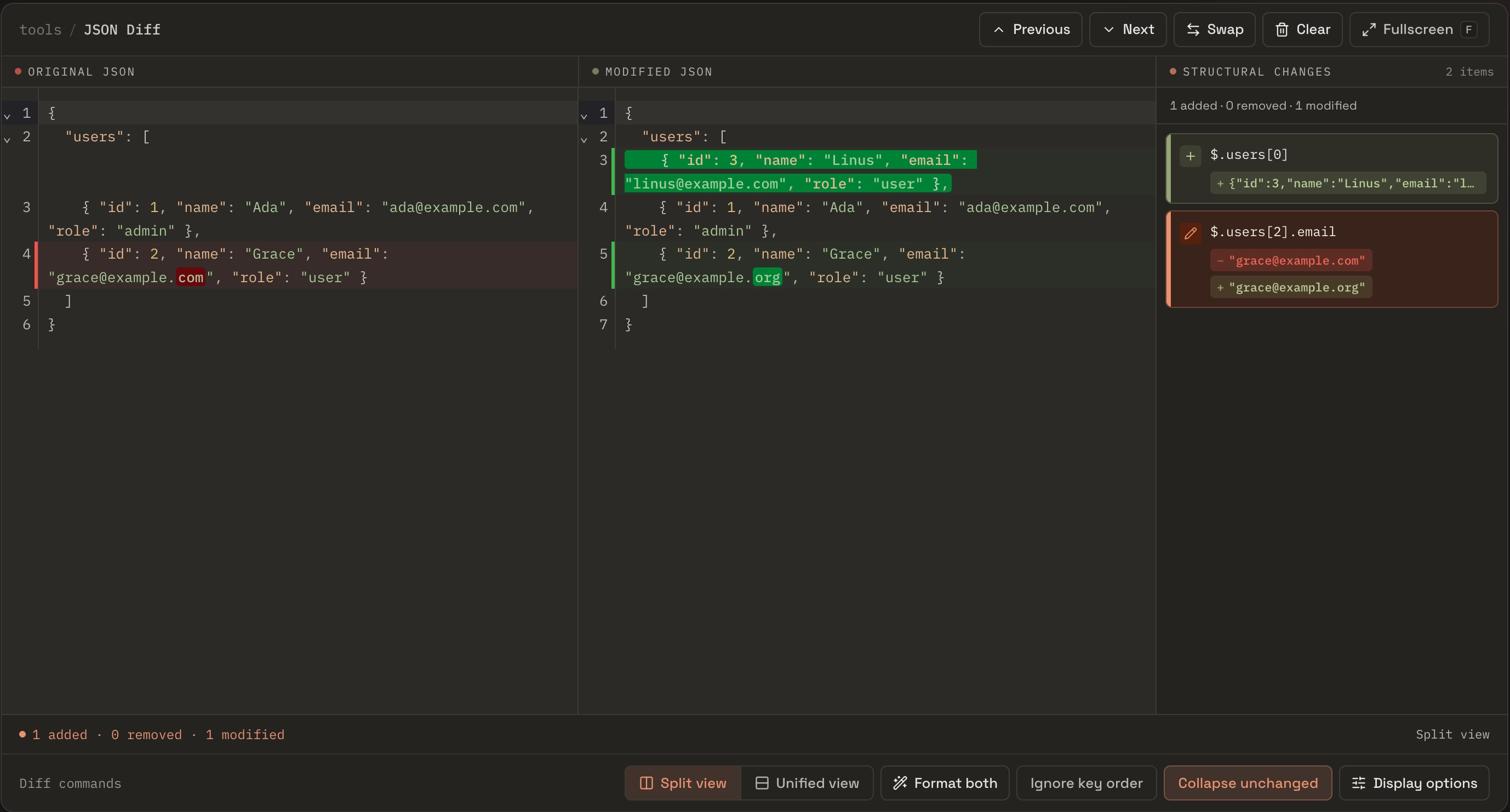
When an array is a list of scalars, or its objects carry none of those keys, it falls back to positional matching — the same floor the terminal and editor approaches live on. There’s a toggle to ignore key order for semantic comparison, unchanged regions collapse so a five-field change in a giant config stays a five-field review, and it all runs in the browser, which is handy when the payload is a production response or a token you’d rather not paste into a remote service. None of this replaces jq and a structural library for pipelines — it’s the no-setup option for a careful look by eye.
Where this actually comes up
The reason it’s worth having more than one method is that “compare two JSON files” hides several different jobs:
- Reviewing an API change. Paste the previous and current responses for an endpoint and confirm only the intended fields moved — including nested objects and long string values, where noise usually hides.
- Config edits.
tsconfig.json,package.json, a linter config, a set of feature flags. Reordered keys are common here and pure noise; comparing semantically keeps the real change visible. - Fixtures and seed data. Diff the old and new version of a test fixture to prove your change touched only the cases you meant to, and didn’t quietly alter a neighbor.
When it isn’t valid JSON yet
Everything above assumes both sides parse. Mid-edit they often don’t — a trailing comma, an unclosed brace, a half-pasted payload — and no structural approach can help until the syntax is fixed, because the parser throws before any comparison begins. Find the break first: jq . file.json or python -m json.tool file.json both report the line and column of the first syntax error, which is usually all you need to spot the stray character. If the two versions are close and you want to see what diverged around the break, a plain line-by-line Text Compare diffs the raw text without trying to parse it. Fix the syntax, then switch back to a structural diff for the real review.
Which method, when
| Situation | Reach for |
|---|---|
| Reformatting or reordered keys | jq -S + diff in the terminal |
| Reordered array items | A structural comparison (code or a JSON-aware tool) |
| Files already open in your editor | Your editor’s built-in file compare |
| Diff inside a test or script | deepdiff with an identity match (Python), or a structural-diff library |
| Ad-hoc visual review, long-string edits | JSON Diff in the browser |
| Input won’t parse yet | jq . / python -m json.tool to find the error, then Text Compare |
The mistake is never “using a diff tool.” It’s using a text diff on data, seeing the whole file turn red, and concluding something big changed when the keys just came out in a different order. Match the comparison to the question — data compared as data, matched by identity, addressed by path — and the changes you actually made are the only ones you see.